Almost every small business that starts looking for employee leave tracking software gets there the same way: through an argument. Someone says they took three days in May, the file says five, and nobody can settle it, because the real record was never made. The leave was asked for in a message, granted with a nod, and noted in a file that nobody remembered to update.
This guide treats leave not as a spreadsheet problem but as a five-link chain: request, approval, record, balance and team calendar. Our example is Norvale Instruments, a fourteen-person manufacturer that has kept leave in one spreadsheet on the office manager's laptop for two years. (Demo data.) The file is not badly built. The problem is not inside the file, it is everything that never reaches it.
The five places a leave spreadsheet breaks
A leave spreadsheet usually survives its first year. It cracks in the second and nobody trusts it by the third. The diagram below shows one year of breakage at Norvale.
What the five have in common is that none of them is carelessness or bad faith. Each is a moment where the record never got made. Nobody typed a wrong number; a step simply never reached anywhere.
- 1. The request was never written down. Leave is usually asked for in one line: "I am off Thursday, that works, right?" If that line does not become a record, the leave still happens and leaves no trace. The rule is simple: every request, spoken or typed, becomes a record the same day, and if it was spoken, whoever heard it files it.
- 2. Nobody owns the approval. In small teams approval happens in a corridor. The problem is not that it was verbal, it is that no name and no date landed anywhere. A year later the discussion is two memories in conflict, and nobody wins that one.
- 3. Two files hold two balances. The office sheet and the finance list diverge at some point. If there are two lists there is no correct list, only the one that was edited more recently.
- 4. Half days and holidays are counted by hand. A public holiday was deducted on one row and left in on another. This single error ends trust in the file, because once one column is wrong, every column becomes suspect.
- 5. Three people ended up off in the same week. The first four are recording problems; this one is a visibility problem. Approve requests one at a time without opening a shared view and three individually reasonable decisions will together cost you a delivery week.
What to record at every link
You do not close these gaps with more discipline. You close them by writing down in advance what gets recorded at each step. The table below is the trail a leave should leave on its way from request to team calendar.
| Link | Record | Fields that must be filled | Who, and when |
|---|---|---|---|
| 1. Request | Leave request | Employee, leave type, start date, end date, note | The employee, the day they think of it |
| 2. Approval | The status field on that record | Status (Pending, Approved, Rejected), decision date, decision maker | The manager, within two working days |
| 3. Record | The day count | Total days, public holidays and weekends deducted, half-day note | Calculated, then checked by a person |
| 4. Balance | Annual entitlement sheet | Hire date, years of service, days entitled, days taken, days left | HR or the office manager, monthly |
| 5. Team calendar | The list of approved leave | Who, which dates, which team | Visible to everyone, at the moment of approval |
Row two is the one everybody skips. An approval given as a single word, with nothing on the record changing, leaves no trace. Think of approval not as a sentence but as a status change: when the field moves from Pending to Approved, the approval has happened; if the field never moved, it has not.
Entitlement and accrual: designing the policy
The balance starts with entitlement, and entitlement starts with a written policy. Statutory minimums vary by country, so build the policy on your local rules and treat anything above them as a deliberate choice. What matters is that these five decisions are written down once, in one place.
| Decision | The common options | What it changes day to day |
|---|---|---|
| Annual entitlement | A flat number for everyone, or a number that grows with service | A growing entitlement needs the hire date on every record and a yearly refresh |
| Granting model | Lump sum on 1 January (or the work anniversary), or monthly accrual | Accrual is fairer mid-year and needs a twelfth of the entitlement added every month |
| Carry-over | None, capped at N days, or expiring at the end of Q1 | Without a cap, unused days pile into December and nobody can staff the month |
| Notice period | Two weeks for planned leave, same day for personal or sick leave | Separating the two stops planned leave being treated as an emergency |
| Leavers | Unused days paid out, or a negative balance repaid | Decide before you need it; deciding during a resignation never ends well |
A worked example of accrual: on a 20-day entitlement, an employee earns 1.67 days a month. Someone who joins on 1 April has earned 15 days by the end of December, not 20. If instead you grant the full 20 on day one and they leave in June, you have paid for days they had not earned. Neither model is wrong; what is wrong is having no model and improvising per person.
The balance table: who has used what, at a glance
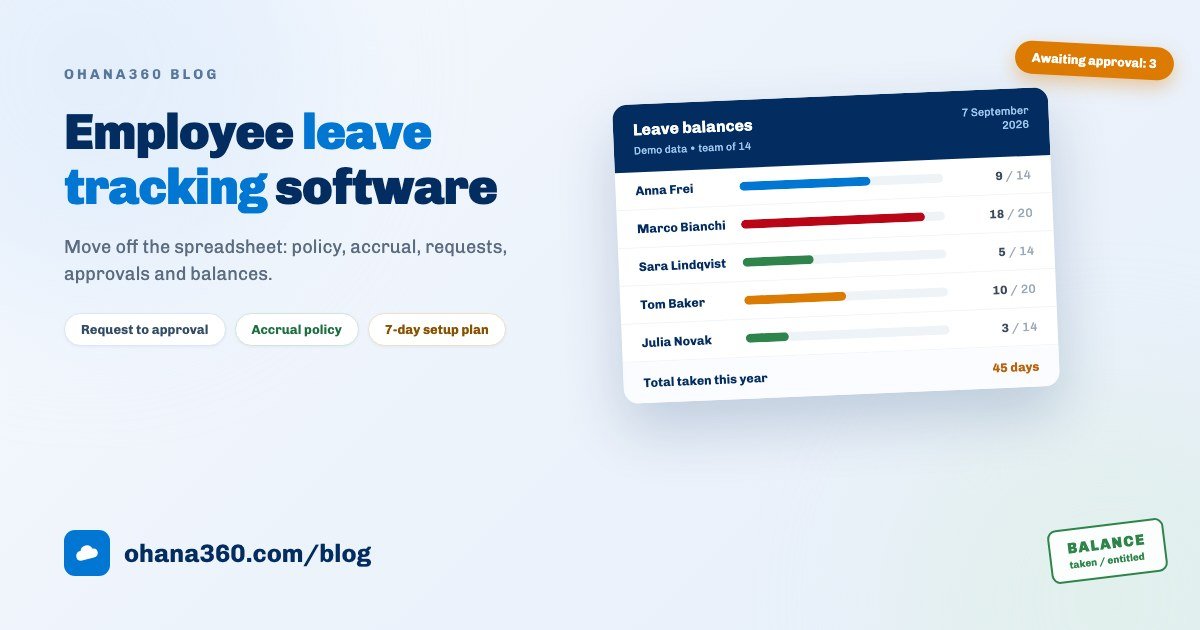
Leave management has one foundational table and it is the balance: entitled, taken and remaining, per person. Norvale's looks like this.
Read it from the extremes, not from the total. The red row is a planning problem: Marco has used 18 of 20 days with months of the year left. The green rows are a problem too, in the other direction: somebody who has taken 3 of 14 days is accumulating carry-over, which is both a liability on your books and an early burnout signal. Three questions to ask of it:
| What you see | What it means | This month's action |
|---|---|---|
| A balance under 3 days | Any unexpected need for the rest of the year becomes an unpaid-leave conversation | Plan the remaining months together now, not in November |
| Less than half the entitlement used | Carry-over is building and will land in one month | Ask for at least one full week to be booked in the last quarter |
| Two people from one team in one week | A cover risk: the second approval was given without seeing the first | Make opening the team view a step before approval |
| An employee who never files a request | They are taking leave with no record; the table is not describing reality | Talk about the habit, then fix the history in one pass |
| A request sitting in Pending for days | The approval queue is blocked and somebody cannot book anything | Set a maximum decision time; two working days is a good threshold |
Review the balance monthly, on the same day. The direction of travel matters as much as the number: if nobody's balance moves in September, you already know that everyone will want the same two weeks in December.
The approval discipline: who decides, how fast, on what basis
Most leave arguments are not about the amount of leave, they are about ambiguity in approval. The five rules below make two different managers decide the same way, which is what actually protects the relationship with the team.
| Rule | Why | How it works in practice |
|---|---|---|
| A minimum notice period | Planned leave and an emergency are different things | Two weeks for annual leave, same day for personal: write both down |
| A maximum decision time | A request left hanging cancels somebody's holiday plans | A decision within two working days, with a reminder if it slips |
| One named approver | A request between two managers becomes nobody's job | Every employee has one approver, plus a named backup |
| No approval without the team view | Individually reasonable decisions add up to a gap in cover | Check the same week's leave before you press approve |
| Rejections carry a reason | An unexplained no is the most expensive message in a small team | Offer an alternative date and put both on the record |
Put these five in the one-page policy and make sure everyone has read it. The long version of making follow-up the system's job rather than a person's is in the automated reminders guide, and the same reasoning applies here: anything that depends on one person remembering stops when that person is, appropriately enough, on leave.
The first 7 days: a setup plan
The most common way this migration fails is trying to move every historical leave at once. Half an hour a day for seven days is enough.
| Day | What to do | What you have at the end of it |
|---|---|---|
| 1 | Enter the team: name, department, title, hire date, manager | The one correct list every service calculation rests on |
| 2 | Build the entitlement sheet once: years of service and the days that go with them | The starting point of every balance, refreshed once a year |
| 3 | Enter this year's taken leave as records; do not migrate previous years | A real days-taken total and a remaining figure you can defend |
| 4 | Write the one-page policy: notice, decision time, approver, carry-over, leavers | A document that makes everyone remember the same rule |
| 5 | Run a 20-minute rehearsal: everyone files one request, a manager approves it | An employee-side flow people will actually use |
| 6 | Set a rhythm for pending requests: one person opens the list every morning | A routine in which nothing sits waiting unnoticed |
| 7 | Put the monthly balance review in the calendar and do the first one | A table that produces no surprises in December |
On day eight, every new request comes out of the system. Running both in parallel helps in week one and hurts in week two: nobody writes the same thing down twice, and if they do, one copy goes stale.
How the leave flow works in Ohana360
HR360 owns the request, approval and record links of this chain. Here is what it does, without inflation, and what it does not do, without hiding it. This is the most important section of the guide.
- Tabs: Home, Employees, Leave Requests, Expenses, Job Applications, alongside Accounts, Contacts, Tasks, Calendar, Files, Reports and Dashboards.
- The employee record: name, title, department, e-mail, phone, hire date, salary and status (Active, On Leave, Left). The salary field is visible to admins only, and only admins create or edit employee records. The record page carries files (contracts, documents), an activity timeline, notes and a post feed.
- The leave request: employee, leave type, start date, end date and a note. The type list ships ready: Annual, Personal, Sick, Unpaid, Parental and Other. On save the total is calculated automatically, counting both the start and end date, and appears in the form immediately.
- Who can file for whom: when the name on an employee record matches the signed-in user's name exactly, a non-admin cannot change the employee picker, so they can only file for themselves. Admins can file on anyone's behalf.
- Approval: a new request is born Pending and a notification goes out to the org. Admins use the Approve and Reject buttons on the Leave Requests list (and on the record) to move it to Approved or Rejected; the decision stays on the record and shows as a coloured badge on the list.
- The list screen: Leave Requests is a full list view: filters by status, type and start date, column selection, sorting, saved views and CSV or Excel export. This is where your balance figures come from.
- The home page strip: the HR360 home page lists every leave starting in the next 7 days, flagging the ones still awaiting approval. Next to it, the Applicants Needing Attention list watches the hiring side.
- Hiring: the Job Applications kanban has five stages: Applied, Interview, Offer, Hired, Rejected. The picker on each card moves it between stages.
- Access and privacy: the employee, leave, expense and application objects can have their org-wide default set to Private in Setup and reopened with a sharing rule. In an app holding personnel data, that is a day-one job.
- Not included: a balance the app keeps and counts down for you, an entitlement field on the employee record, a public holiday calendar and automatic holiday deduction, half-day leave, approved leave appearing on the shared calendar, payroll integration, using leave requests in the flow canvas or the report builder, and bulk CSV import of the employee list. For all of these you keep your existing setup.
Want to see the flow in 102 seconds?
Getting the balance in practice
Because there is no balance field, you build the calculation yourself, and it is a fifteen-minute job a month. The order:
- Build the entitlement sheet once a year. Export the employee list with hire dates, work out years of service, and write the entitled days next to each name.
- Take days used from the list, month by month. On Leave Requests, filter status to Approved, make the Days column visible, export, and total by employee.
- Keep the remainder on one sheet. Entitled minus taken. That page does not replace the app; it summarises the records in it, and the underlying data is no longer disputed.
Why say this so bluntly? Because "automatic balances" is a phrase used very freely, and discovering after purchase that it is not there costs far more than knowing up front. What HR360 genuinely solves is not the arithmetic of the balance, it is the existence of the record: the request is written, the approval is dated, the decision is permanent.
Which reports to build
There is an honest boundary here too. On the HR side the report builder covers Employees, Expenses and Job Applications; Leave Requests is not a report builder object. Leave analysis happens through the list view and export instead. The reports worth building:
| # | Report | Object | Group by | Measure / filter |
|---|---|---|---|---|
| 1 | Employees by department | Employees | Department | Record count (ready-made) |
| 2 | Employees by status | Employees | Status | Record count |
| 3 | Hires by year | Employees | Hire date (year) | Record count, gives your service mix |
| 4 | Expenses by category | Expenses | Category | Sum of amount (ready-made) |
| 5 | Expense amount by month | Expenses | Date (calendar month) | Sum of amount |
| 6 | Applications by stage | Job Applications | Stage | Record count (ready-made) |
| 7 | Applications by position | Job Applications | Position | Record count |
| 8 | Leave awaiting approval | Leave Requests (list) | - | Filter: Status = Pending, then export |
Row eight is deliberately different: it is a saved list view, not a report. Save the pending filter and favourite the list, and you get a one-click queue every morning, which for most small teams is more useful than a dashboard.
If your people records still live in spreadsheets, start the migration there: the Excel tracking guide covers the migration order and the usual traps. When expenses and receivables come next, the invoice and payment tracking guide applies the same logic to finance, and the what is CRM guide is a good starting point for the platform as a whole. Current numbers are on the pricing page, and you can request a demo to try it with your own data.
Frequently asked questions
What does employee leave tracking software actually do?
How much annual leave should a small business give?
Accrual or a lump sum at the start of the year?
Does Ohana360 calculate leave balances automatically?
Can employees file their own requests, and who approves them?
Do approved leaves show up on a shared team calendar?
Put leave on the record, not in someone's memory
The request is written, the approval is dated, the decision stays. Employees file their own requests, managers approve in one click, and next week's absences show up on the home page.